Products / Windows app
JAgentsBeta
JAgents is free, open source (MIT), and out now in beta. Run Claude Code, Codex, Devin, Cursor and other coding agents side by side in one window, in threads or terminals, and let them message each other, start subagents, and hand off work.
What beta means
JAgents is released and ready to use. It is still new, so some parts will change and you may hit bugs.
Updates come from GitHub Releases. JAgents checks at startup and every 6 hours, and the Updates box in the sidebar installs a new version when you click Install.
Found a bug? Report it on Discord.
Features
What JAgents does
JAgents runs the agents you already have installed. Sign in to each agent the way you normally would, and JAgents finds it.
Run agents
- TerminalsClaude Code, Codex, Cursor Agent, the Devin CLI, or a plain shell, in a real terminal.
- ThreadsChat with Devin, Cursor, Claude Code, Codex, Gemini CLI, OpenCode, GitHub Copilot CLI, or Kimi CLI.
- Code modeTerminals and threads split the window as a grid, in columns, or in rows.
- Thread modeEvery thread in a list, one open at full width.
Agents talk to each other
- Built-in MCP serverEvery agent gets a short name like
claude-1and can see who else is running. - MessagesAn agent can send another a task. A busy chat gets it queued as its next message.
- SubagentsStart any installed chat agent on a task and wait for its answer.
- Hand offPass work to another agent so it keeps going where the first one stopped.
Make it yours
- PluginsAn agent can add a button, a sidebar section, a pane, or an MCP tool. Every change can be undone.
- MCP hubInstall the same MCP server into Claude Code, Codex, Cursor, and Gemini CLI so they reach it outside JAgents too.
- Coming from RelayMCP hub > Legacy (development) > Import from legacy Relay copies your threads, layout, plugins, and MCP setup.
How to install
Install JAgents
Three steps. No admin rights needed.
1. Download the setup
Click Install for Windows. Your browser saves JAgents-Setup.exe. When it finishes, open it from your Downloads folder.
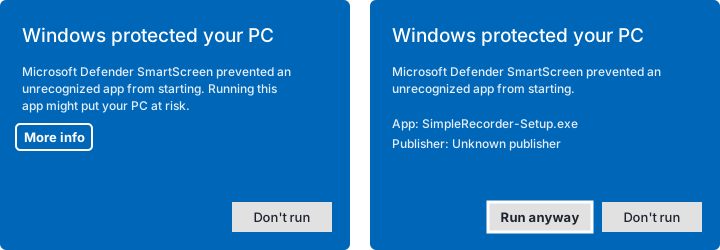
2. Allow it to run
Windows may show Windows protected your PC, because the app is not signed by a known publisher. Click More info, then Run anyway.
3. Open JAgents
The setup installs JAgents to %LOCALAPPDATA%\Programs\JAgents, adds it to the Start Menu and your desktop, and opens it. Close JAgents first if it is already running. Then start an agent in a terminal or a thread.
Get JAgents
Download the installer
Get the newest installer from this site, then follow the install steps above.
From this website
Downloads the newest JAgents-Setup.exe straight from this site.
Checking the latest release...
From GitHub Releases
Always the newest build. Older versions and release notes are on the Releases page.
Published as a GitHub Release on every update.
From source
Clone the repo and run it with Node.js 22.5 or newer.
git clone https://github.com/Josephivgi/JAgents.git
cd JAgents
npm install
npm start
Your files
Where everything goes
| What | Folder |
|---|---|
| The app | %LOCALAPPDATA%\Programs\JAgents |
| Threads, layout, and plugins | %APPDATA%\JAgents |
| MCP hub files | %USERPROFILE%\.jagents |
Uninstall
Open Settings > Apps, find JAgents, and choose Uninstall. Your threads and settings in %APPDATA%\JAgents are kept.
System requirements
Windows 10 or Windows 11, 64 bit, and at least one coding agent installed and signed in, such as Claude Code, Codex, Devin, or Cursor.
Read more
How to run several coding agents at once, how JAgents was built, and the code on GitHub.
FAQ
Common questions
What is JAgents?
JAgents is a free, open source (MIT) agent manager for Windows 10 and 11 from JSystems. It runs AI coding agents such as Claude Code, Codex, Devin, and Cursor side by side in one window, in terminals or chat threads, and lets them message each other through a built-in MCP server. It is out now in beta.
How do I run Claude Code and Codex at the same time on Windows?
Install JAgents from jsystems.app/jagents and open a terminal for each agent. In Code mode the terminals and threads split the window as a grid, in columns, or in rows, so you can watch both agents work at once.
Can AI coding agents talk to each other?
Yes, in JAgents. Its built-in MCP server gives every agent a short name like claude-1 and tools to list the other agents, send them messages, read their work, start subagents, wait for their answers, and hand off work.
Which coding agents does JAgents support?
Terminals run Claude Code, Codex, Cursor Agent, the Devin CLI, or a plain shell. Chat threads run Devin, Cursor, Claude Code, Codex, Gemini CLI, OpenCode, GitHub Copilot CLI, or Kimi CLI.
Is JAgents free?
Yes. JAgents is free and open source under the MIT license, with its code on GitHub. The agents it runs have their own accounts and plans.
Does JAgents come with the agents?
No. JAgents runs the agents you already have installed. Install and sign in to each one the way you normally would, and JAgents finds it.