Products / Windows app
JMCPBeta
One place to set up every AI coding agent on your PC. Press one button and Claude Code, Codex, Cursor, Gemini CLI and five more agents all get the same rules, memory and skills, can hand work to each other, and get a browser you can watch and take over. Free, open source (MIT), and in beta, with the code on GitHub.
Suggested Install with one command
Open PowerShell (press Start, type PowerShell, press Enter), paste this and press Enter:
irm https://raw.githubusercontent.com/Josephivgi/JAgents/main/install.ps1 | iexIt asks yes or no for each JSystems app (Simple Recorder, JAgents, JPerformance, JServer, JMCP, JVoice), then installs the ones you pick straight from GitHub, adds them to the Start Menu, pins them to the taskbar and opens them. An app you already have can be updated or reinstalled, and its data is backed up first. The apps install without admin rights and with no "Windows protected your PC" screen. Windows asks once for permission to add the taskbar pins. It can take up to 10 minutes depending on how many apps you pick. That is normal: it shows progress every 5 seconds.
What beta means
JMCP is released and ready to use. It is still new, so some parts will change and you may hit bugs.
Updates come from GitHub Releases. When there is a new version, the bottom of the sidebar shows Update. Nothing installs until you press it.
Found a bug? Report it on Discord.
Features
What JMCP does
JMCP works with Claude Code, Codex, Factory Droid, OpenCode, Devin, Cursor, Gemini CLI, Qwen Code and Grok. It finds the ones on your PC and adds the same extras to each of them.
Set it up once
- Install allOne button adds every JMCP extra to every agent found on your PC. Each agent's config file is backed up before its first change.
- RulesWrite a "do" or "don't" once, for example "never delete files without asking". Every agent reads it.
- Master instructionsOne note every agent must follow in every task. Only you can change it, from the JMCP window.
Agents that share and team up
- MemoryWhat one agent learns about you, another can look up. Agents can't save passwords or keys there.
- SkillsStep-by-step how-tos every agent can use, even agents with no skills feature of their own.
- HelpersOne agent can hand a task to another, for example Claude Code asking Codex. The Activity page shows what each helper did.
See what they do
- BrowsersAgents get a hidden browser with no windows on your screen. Watch it live on the Browsers page.
- Take controlIf an agent hits a CAPTCHA or a login, it hands the browser to you. Click and type in the live page, then hand it back.
- HealthChecks your PC, and any servers in your SSH config, and explains in plain words what is slow or wrong.
How to install
Install JMCP
JMCP installs for your Windows user, with no admin rights. Install at least one of the agents it works with, and sign in to it, before you start.
Suggested Install with one command
Open PowerShell (press Start, type PowerShell, press Enter), paste this and press Enter:
irm https://raw.githubusercontent.com/Josephivgi/JAgents/main/install.ps1 | iexIt asks yes or no for each JSystems app (Simple Recorder, JAgents, JPerformance, JServer, JMCP, JVoice), then installs the ones you pick straight from GitHub, adds them to the Start Menu, pins them to the taskbar and opens them. An app you already have can be updated or reinstalled, and its data is backed up first. The apps install without admin rights and with no "Windows protected your PC" screen. Windows asks once for permission to add the taskbar pins. It can take up to 10 minutes depending on how many apps you pick. That is normal: it shows progress every 5 seconds. Run the same line again later to update JMCP, or press Update in the app.
Or install it by hand
1. Download the setup
Click Download for Windows. Your browser saves JMCP-Setup.exe to your Downloads folder.
2. Run it
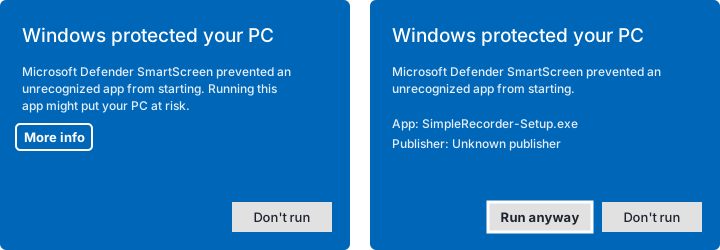
Double-click JMCP-Setup.exe. Windows may show Windows protected your PC, because the app is not signed by a known publisher yet. Click More info, then Run anyway. JMCP installs and opens.
3. Press Install all
On the JMCP servers page, press Install all. JMCP adds its extras to every agent it found. Agents that are already open pick them up the next time you start them.
Get JMCP
Download the app
Get the newest version from this site, then follow the install steps above.
From this website
Downloads the newest JMCP-Setup.exe straight from this site.
Checking the latest release...
From GitHub Releases
Every version and its release notes. Download the JMCP-Setup file from the newest release.
Published as a GitHub Release on every update.
From source
Clone the repo and run it with Node.js 22.13 or newer.
git clone https://github.com/Josephivgi/JMCP.git
cd JMCP
npm install
npm start
Your files
Where everything goes
| What | Folder |
|---|---|
| The app | %LOCALAPPDATA%\Programs\jmcp |
| Rules, memory, skills and history | %USERPROFILE%\.jmcp |
| Each agent's settings | The agent's own config file, with a .jmcp-backup copy next to it |
Uninstall
First remove JMCP's extras from your agents on the JMCP servers page, so they stop looking for them. Then open Windows Settings, Apps, find JMCP and choose Uninstall. Delete %USERPROFILE%\.jmcp too if you don't want to keep your rules, memory and skills.
System requirements
Windows 10 or Windows 11, 64 bit. At least one of the coding agents above, installed and signed in. The agent browser uses Chrome or Microsoft Edge, which comes with Windows.
FAQ
Common questions
Do I need to know what MCP is to use JMCP?
No. MCP is the way coding agents plug in extra tools. JMCP does the plugging in for you: open it, press Install all, and every agent on your PC gets the same extras.
Which agents does JMCP work with?
Claude Code, Codex, Factory Droid, OpenCode, Devin, Cursor, Gemini CLI, Qwen Code and Grok. JMCP finds the ones installed on your PC. You install and sign in to the agents themselves.
Does JMCP change my agents' settings?
It adds its servers to each agent's own config file and leaves everything else in that file as it was. The first time it changes a file it saves a backup copy next to it, ending in .jmcp-backup.
Can an agent's browser open windows on my screen?
No. The browser runs hidden, with no window. You watch it on the Browsers page of JMCP, and you can take control there when the agent asks for help, for example to solve a CAPTCHA.
Does JMCP send my data anywhere?
No. Rules, memory, skills and history stay on your PC in the .jmcp folder in your user folder. JMCP itself only asks GitHub whether there is a new version. Your agents still talk to their own services as they always do.
Why is JMCP in beta?
It works and is ready to use, but it is new and still changing, so some parts will change and you may hit bugs.
Is JMCP open source?
Yes. JMCP is free and open source under the MIT license. The code is at github.com/Josephivgi/JMCP.