Products / Windows app
JVoiceBeta
Hold a shortcut, talk, let go. JVoice turns your speech into text and types it wherever your cursor is, in any Windows app. It can clean up what you said with AI, and its speed test shows how many words per minute you talk. Free, open source (MIT), and in beta, with the code on GitHub.
Suggested Install with one command
Open PowerShell (press Start, type PowerShell, press Enter), paste this and press Enter:
irm https://raw.githubusercontent.com/Josephivgi/JAgents/main/install.ps1 | iexIt asks yes or no for each JSystems app (Simple Recorder, JAgents, JPerformance, JServer, JMCP, JVoice), then installs the ones you pick straight from GitHub, adds them to the Start Menu, pins them to the taskbar and opens them. An app you already have can be updated or reinstalled, and its data is backed up first. The apps install without admin rights and with no "Windows protected your PC" screen. Windows asks once for permission to add the taskbar pins. It can take up to 10 minutes depending on how many apps you pick. That is normal: it shows progress every 5 seconds.
What beta means
JVoice is released and ready to use. It is still new, so some parts will change and you may hit bugs.
You need an OpenRouter key. JVoice is free, and OpenRouter charges your account for the speech to text and AI cleanup you use.
Updates come from GitHub Releases. JVoice checks when it starts, every hour and when your PC wakes, then restarts into the new version when you are not dictating. Check for updates is in the sidebar.
Found a bug? Report it on Discord.
Features
What JVoice does
JVoice runs in the tray. Click into any text field, hold Ctrl + Win, speak, and let go. Press Esc while recording to cancel.
Talk instead of type
- Any appThe text is typed where your cursor is: email, chat, documents, code editors, the browser.
- Your shortcutAny combo of two or more keys, or one F13 to F24 key. Hold it to talk, or press it to start and stop.
- Speech to textElevenLabs Scribe v2, or Scribe v2 Medical, through your OpenRouter key. Auto language or a fixed one.
Clean text, in the right place
- AI cleanupLight cleanup removes um and uh, applies "no wait" corrections and adds punctuation. Rewrite turns what you said into clear, polished text.
- Never in the wrong windowIf you switch windows while JVoice works, or still hold keys when it is ready, the text is copied instead of pasted.
- DictionaryWords JVoice should always spell your way, like names and product terms.
See how you talk
- Speed testTalk for 30 seconds, an hour, up to 3 hours, or with no limit. JVoice shows your words per minute and characters per minute as you go.
- No chat AI to countThe speech model writes down what you say. JVoice counts the words and characters itself, and keeps your past results with your best marked.
- HistoryEvery dictation, the raw transcript, and Retry for recordings that failed to transcribe.
How to install
Install JVoice
JVoice installs for your Windows user, with no admin rights. Get an OpenRouter key before you start: it starts with sk-or-.
Suggested Install with one command
Open PowerShell (press Start, type PowerShell, press Enter), paste this and press Enter:
irm https://raw.githubusercontent.com/Josephivgi/JAgents/main/install.ps1 | iexIt asks yes or no for each JSystems app (Simple Recorder, JAgents, JPerformance, JServer, JMCP, JVoice), then installs the ones you pick straight from GitHub, adds them to the Start Menu, pins them to the taskbar and opens them. An app you already have can be updated or reinstalled, and its data is backed up first. The apps install without admin rights and with no "Windows protected your PC" screen. Windows asks once for permission to add the taskbar pins. It can take up to 10 minutes depending on how many apps you pick. That is normal: it shows progress every 5 seconds. JVoice also updates itself.
Or install it by hand
1. Download the setup
Click Download for Windows. Your browser saves JVoice-Setup.exe to your Downloads folder.
2. Run it
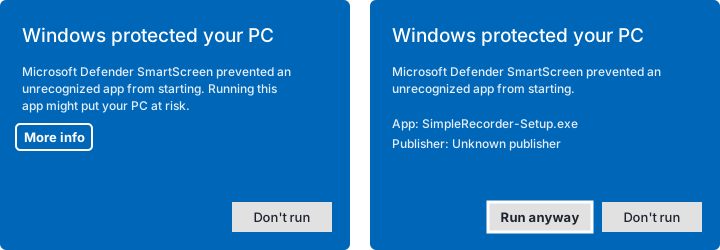
Double-click JVoice-Setup.exe. Windows may show Windows protected your PC, because the app is not signed by a known publisher yet. Click More info, then Run anyway. Choose Only for me (no admin rights needed), keep the folder it suggests or pick another, and press Install.
3. Paste your key
When JVoice opens, paste your OpenRouter key. Then click into any text field, hold Ctrl + Win, talk, and let go. Closing the window keeps JVoice running in the tray. Quit it from the tray icon.
Get JVoice
Download the app
Get the newest version from this site, then follow the install steps above.
From this website
Downloads the newest JVoice-Setup.exe straight from this site.
Checking the latest release...
From GitHub Releases
Every version and its release notes. Download the JVoice-Setup file from the newest release.
Published as a GitHub Release on every update.
From source
Clone the repo and run it with Node.js.
git clone https://github.com/Josephivgi/JVoice.git
cd JVoice
npm install
npm start
Your files
Where everything goes
| What | Folder |
|---|---|
| The app | %LOCALAPPDATA%\Programs\JVoice |
| Settings, history, dictionary and speed test results | %APPDATA%\JVoice, in a SQLite file |
| Your OpenRouter key | The same file, encrypted with your Windows account |
Uninstall
Quit JVoice from the tray icon. Then open Windows Settings, Apps, find JVoice and choose Uninstall. Delete %APPDATA%\JVoice too if you don't want to keep your settings and history.
System requirements
Windows 10 or Windows 11, 64 bit. A microphone, an internet connection, and an OpenRouter key with credit on it.
FAQ
Common questions
Do I need an OpenRouter key?
Yes. JVoice uses your own OpenRouter key for speech to text and for AI cleanup, so it is the only account you need. Get a key at openrouter.ai/settings/keys and paste it when JVoice first opens.
What does it cost?
JVoice is free. OpenRouter charges your account for the speech to text and AI cleanup you use. The Home page of JVoice shows how much you have spent.
Where does my voice go?
Each recording is sent to OpenRouter, which runs ElevenLabs Scribe v2 to write it down. With AI cleanup on, the text then goes to the chat model you picked, through OpenRouter too. Your settings, history and dictionary stay on your PC. Audio is only kept on your PC for dictations that failed, so you can retry them.
What if I switch windows while it works?
If you switch windows while JVoice is working, or still hold keys when the text is ready, JVoice copies the text instead of pasting it, so it never lands in the wrong place. Paste it with Ctrl + V.
How does the speed test work?
Pick how long to talk, from 30 seconds up to 3 hours or with no limit, and press Start test. The speech model writes down what you say, then JVoice counts the words and characters itself, with no chat AI. It shows words per minute and characters per minute, and keeps your past results.
Why is JVoice in beta?
It works and is ready to use, but it is new and still changing, so some parts will change and you may hit bugs.
Is JVoice open source?
Yes. JVoice is free and open source under the MIT license. The code is at github.com/Josephivgi/JVoice.